What are Second-Generation Managed Packages (2GP)?
At its core, a managed package is a container for your Salesforce app. It holds your Apex classes, custom objects, Lightning pages, and Flows, allowing you to distribute and monetize your app on the AppExchange.
Unlike 1GP, where the packaging org was the ultimate source of truth, 2GP is completely source-driven. Your Version Control System (VCS)—like GitHub or GitLab—is the master record.
When you combine source-driven development with Salesforce DX, 2GP opens the door to automated testing, flexible versioning, and parallel development streams.
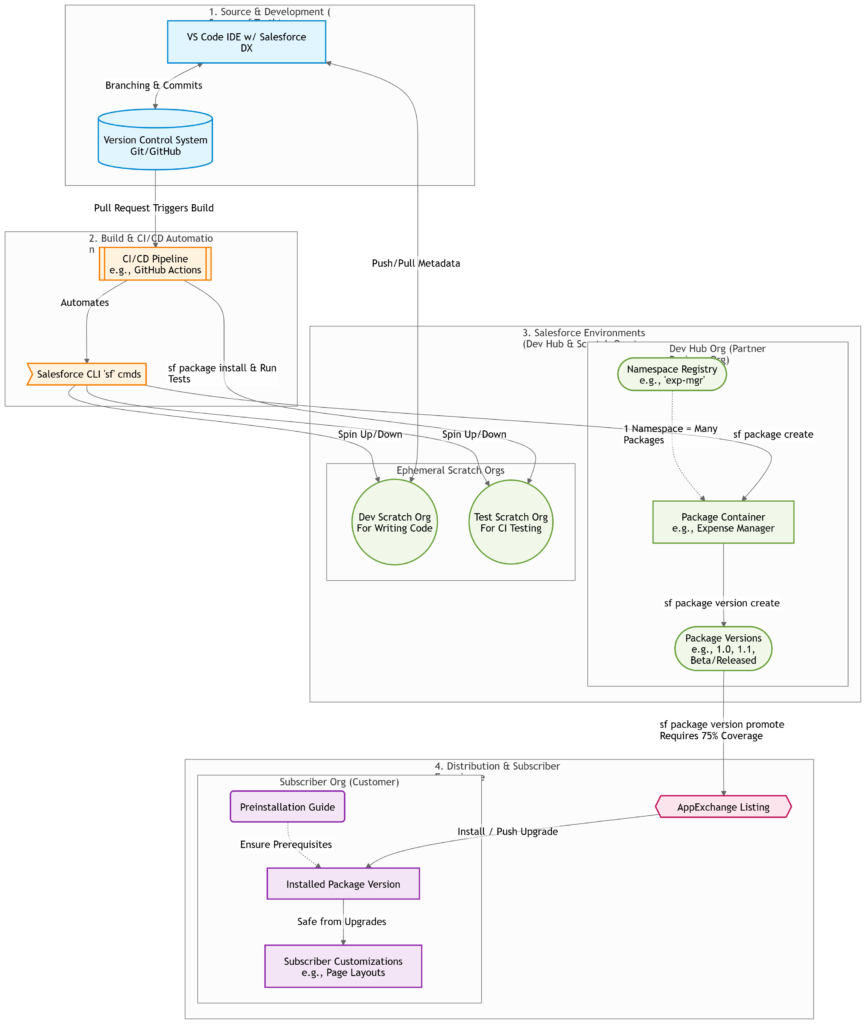
The Complete Salesforce 2GP Architecture
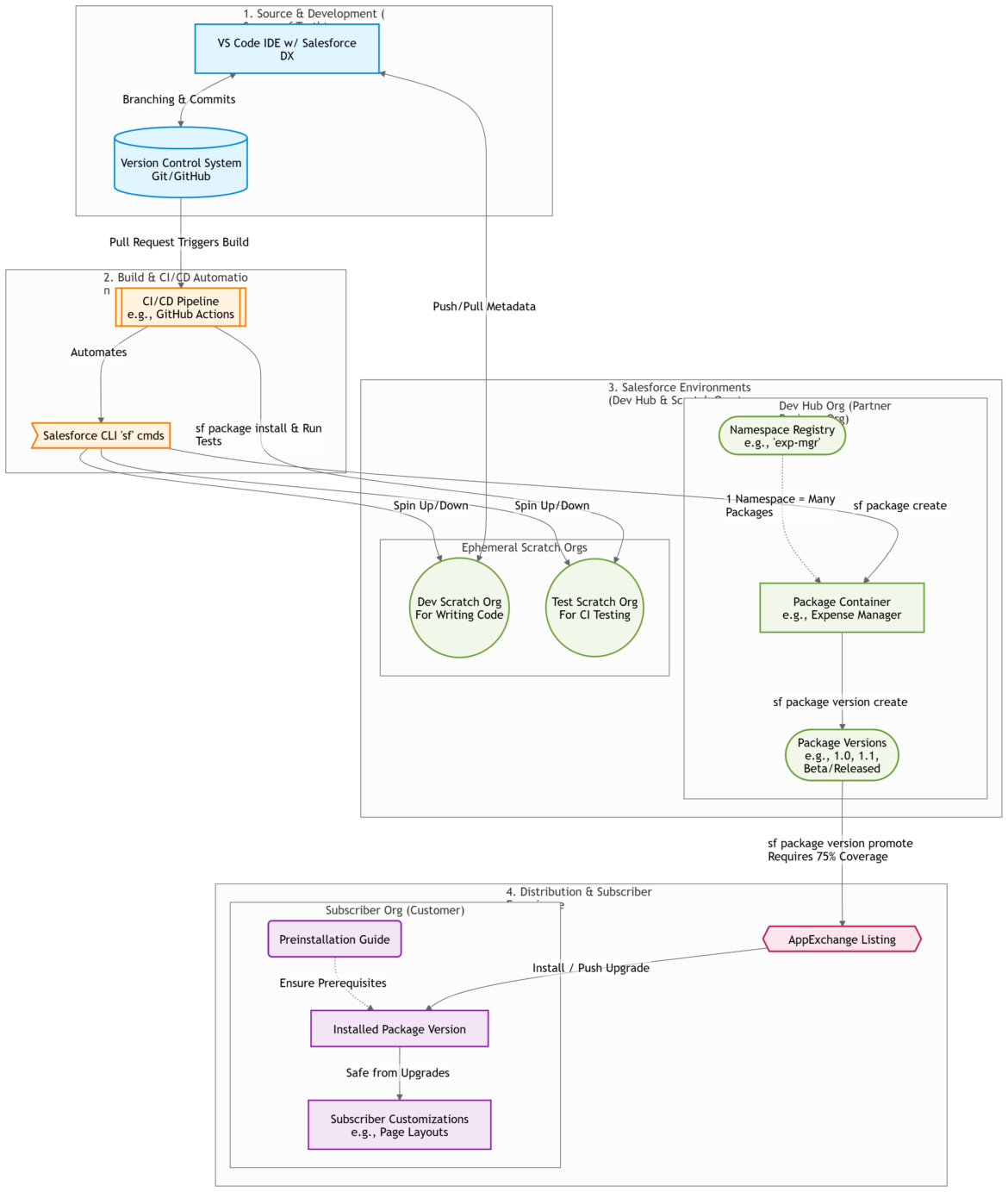
To truly understand the power of 2GP, it helps to see the big picture. Here is the complete lifecycle of a 2GP package, from your IDE to your customer’s Salesforce org.
Why Migrate from 1GP to 2GP? (Core Benefits)
If you are still maintaining 1GP packages, here is why you should consider migrating to 2GP today:
1. Say Goodbye to Packaging Orgs
With 2GP, you no longer need to juggle multiple packaging and patch orgs. Development and testing happen in ephemeral, disposable Scratch Orgs, while your source code lives safely in Git.
2. Share Code Across Packages (Modular Architecture)
In 1GP, namespaces were locked 1:1 with packages. In 2GP, multiple packages can share the same namespace. Using the @namespaceAccessible annotation, you can share internal Apex classes across your micro-packages without exposing them to the global API.
3. Flexible Package Ancestry
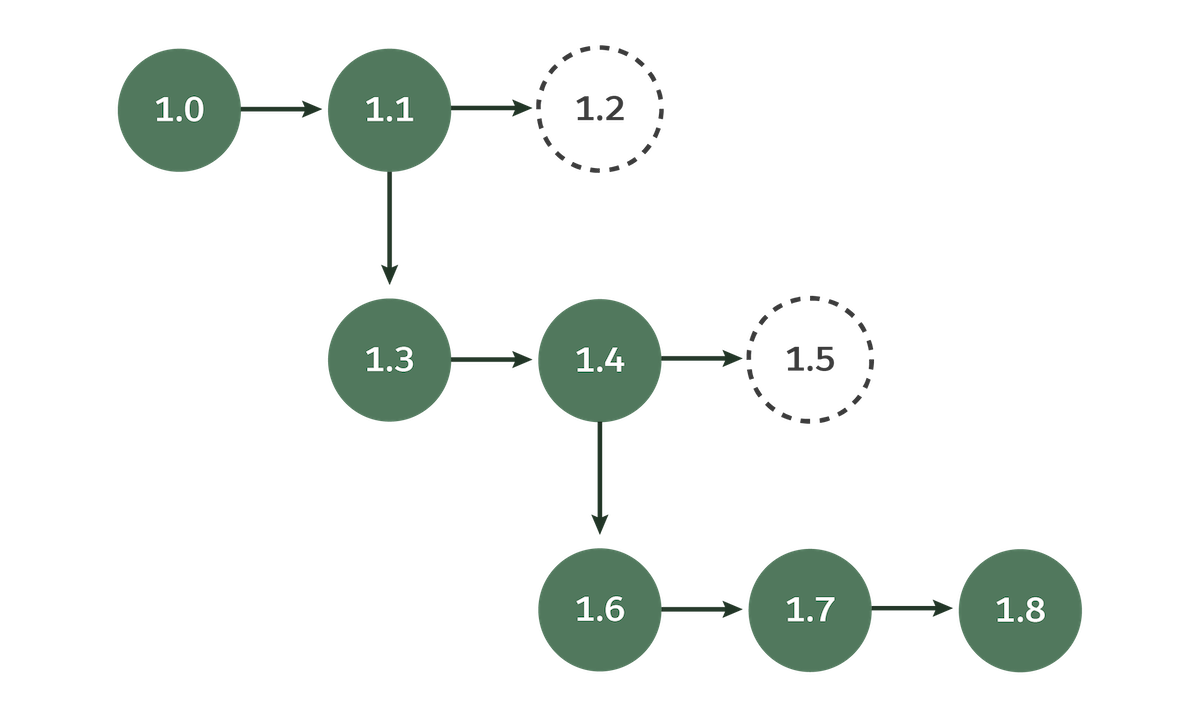
Mistakes happen. If you release version 1.2 and realize it breaks functionality, 2GP’s tree-like versioning (Package Ancestry) allows you to abandon it. You can simply create version 1.3 branching directly off the stable 1.1 release.
4. Parallel Development Streams
Because 2GP is source-driven, multiple development teams can work on the same package simultaneously. Team A and Team B can branch off the latest released version in Git, build features in isolated scratch orgs, and merge them later without stepping on each other’s toes.

The 6-Step 2GP Development Workflow
Ready to build? The API-first nature of 2GP makes it incredibly easy to automate using the Salesforce CLI (sf commands). Here is the standard workflow:

- Create a Salesforce DX Project: Initialize your project and set up your Git repository.
- Develop Your App: Spin up a scratch org, write your code in VS Code, and pull the metadata into your local project.
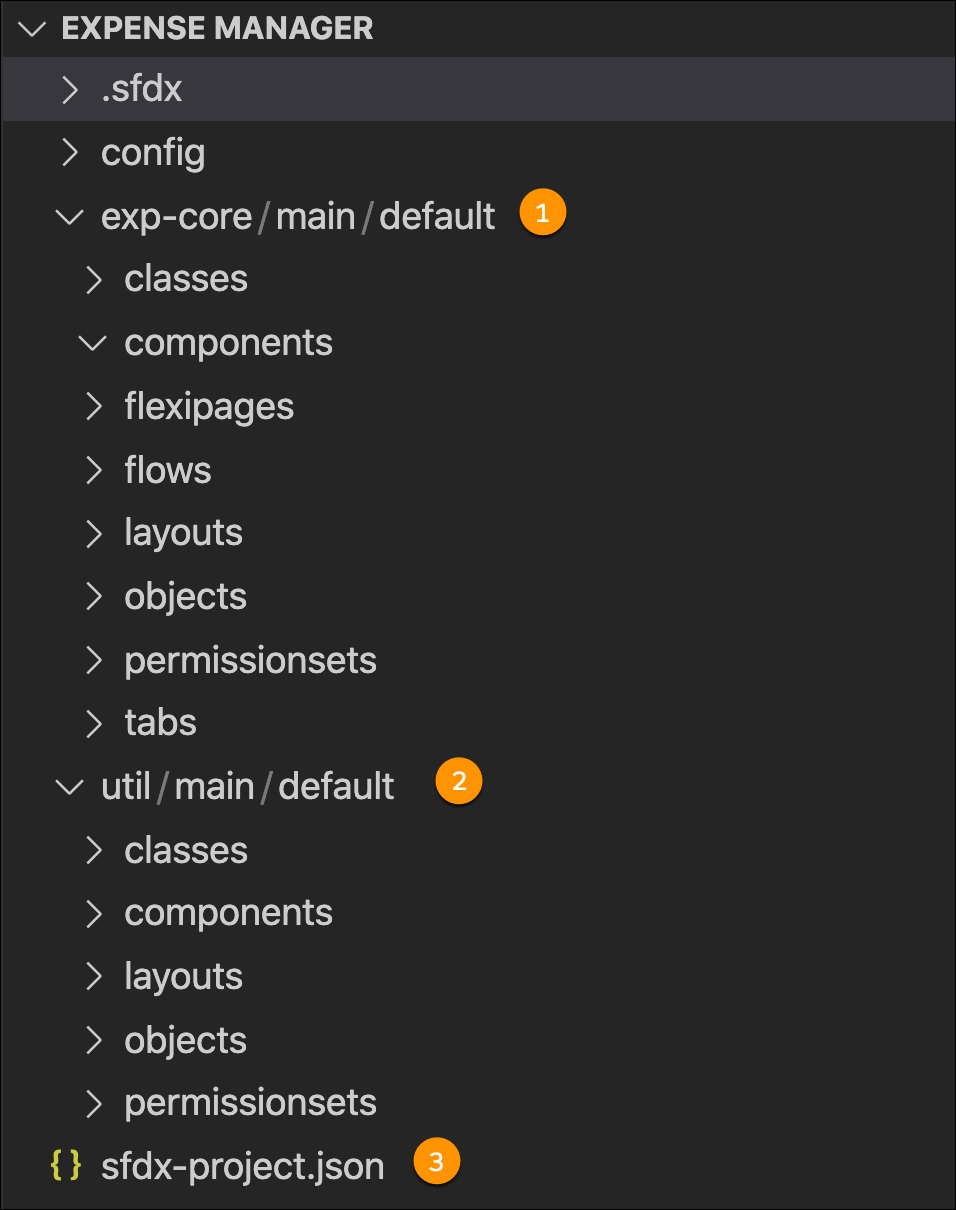
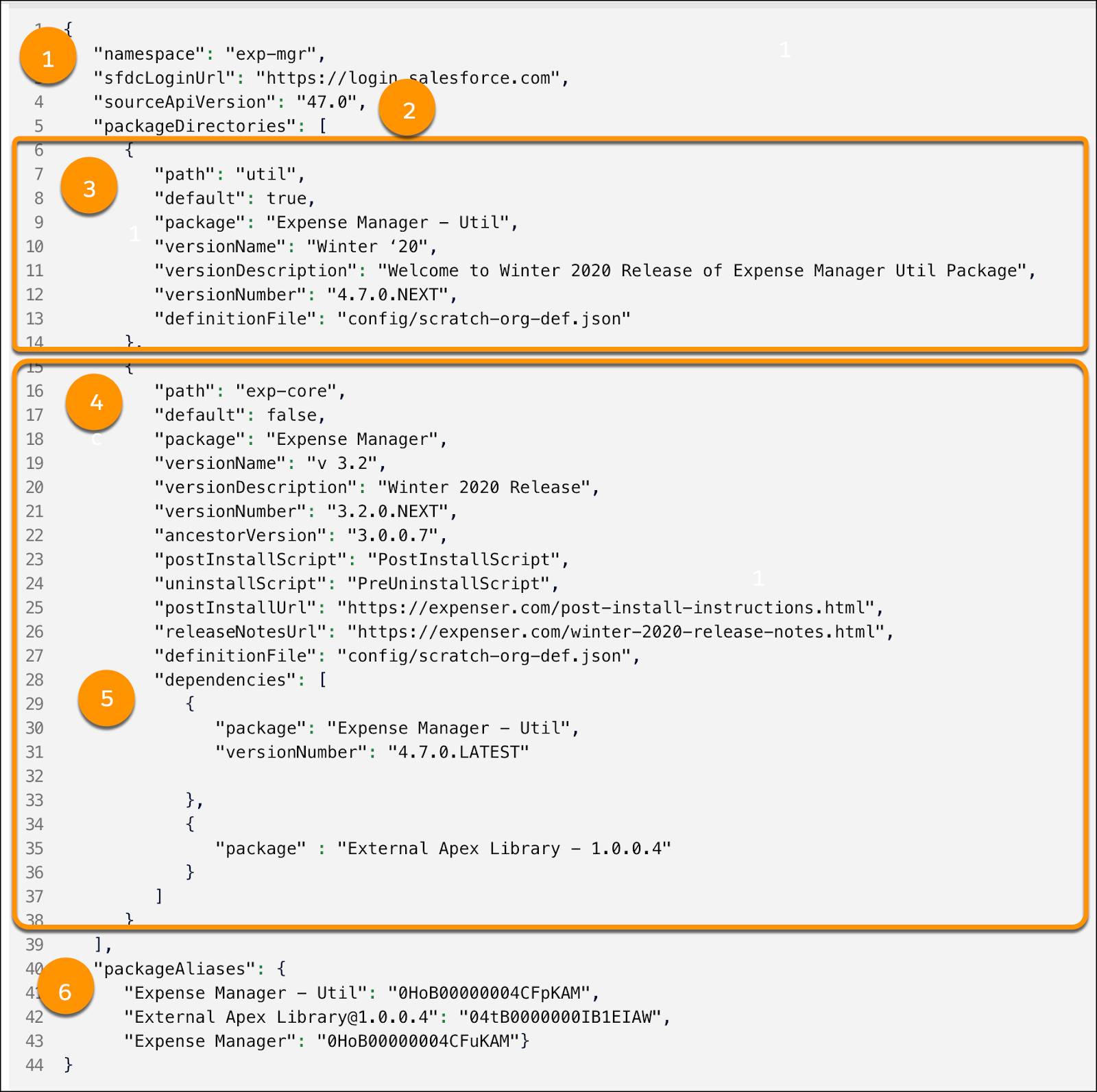
- Configure the Package: Define your namespace, dependencies, and aliases in the
sfdx-project.jsonfile. Then, runsf package createagainst your Dev Hub (you only do this once).
- Pro-Tip: You can organize multiple packages in a single Salesforce DX project.
- Create a Package Version: Run
sf package version createto take an immutable snapshot of your metadata. - Test in a Clean Scratch Org: Spin up a fresh scratch org, install the new package version, and run your automated Apex tests.
- Promote to Released: Once your package meets the strict quality gates (minimum 75% code coverage and 100% trigger coverage), use
sf package version promoteto make it production-ready.
The Subscriber Experience: What Do Your Customers See?
Your end-users won’t see the underlying architecture, but 2GP ensures they get a seamless experience:
- Safe Customizations: Subscribers can tweak allowed components (like page layouts) without fear. 2GP guarantees these customizations persist through future upgrades.
- Patch Versions: Found a bug? You can release a highly restricted patch version (e.g.,
1.2.1.0) to fix it. Subscribers on older major versions can get the bug fix without being forced into a massive feature upgrade. - Push Upgrades: Developers can either notify subscribers of an update or forcefully push critical upgrades directly to their orgs.
Final Thoughts: The Future is 2GP
Salesforce is fully committed to Second-Generation Managed Packaging. By adopting 2GP now, you align your app development with modern CI/CD practices, reduce administrative overhead, and future-proof your AppExchange offerings.
Are you planning to migrate your Salesforce apps to 2GP? Let us know your thoughts or questions in the comments below!
Official Resources
Why Switch to Second-Generation Managed Packaging?
Comparison of First- and Second-Generation Managed Packages
Package Ancestors
Enjoyed this guide? Don’t forget to share it with your fellow Salesforce developers!